eSIM Phone By USB Tethering To Landscape WAN 实践记录
1. First | 序
此篇记录实现 eSIM 安卓手机通过 USB 共享网络的方式作为 Landscape Router WAN 流量出口过程
📦
本篇所使用到的操作系统&软件版本(配置)如下所示
📱
本篇所使用到的 eSIM 手机型号为 Rakuten BIG s(楽天ビッグエス)
1.1. Preconditions | 前提条件
1.1.1. modules-load | 加载模块
OS 若不能识别插入设备则需要加载相应的内核模块
例如以下情况 ( journalctl -k -f )
Apr 16 22:31:00 CAN-LandscapeRouter kernel: usb 1-4: new high-speed USB device number 12 using xhci_hcd
Apr 16 22:31:01 CAN-LandscapeRouter kernel: usb 1-4: New USB device found, idVendor=1ebf, idProduct=705b, bcdDevice= 4.19
Apr 16 22:31:01 CAN-LandscapeRouter kernel: usb 1-4: New USB device strings: Mfr=1, Product=2, SerialNumber=3
Apr 16 22:31:01 CAN-LandscapeRouter kernel: usb 1-4: Product: LITO-MTP _SN:6E70A3F0
Apr 16 22:31:01 CAN-LandscapeRouter kernel: usb 1-4: Manufacturer: Yulong
Apr 16 22:31:01 CAN-LandscapeRouter kernel: usb 1-4: SerialNumber:
由以上信息可以观察到
- 物理层面的 USB 连接建立正常
- 没有驱动加载的动作
后续我们检查以下相应模块是否加载
lsmod | grep -E "rndis|cdc_ether|usbnet"

# 如果没有任何输出,尝试手动加载
sudo modprobe rndis_host
sudo modprobe cdc_ether
加载完成后再次尝试插入设备而后观察内核日志 journalctl -k -f
Apr 16 22:42:36 CAN-LandscapeRouter kernel: usb 1-4: new high-speed USB device number 14 using xhci_hcd
Apr 16 22:42:36 CAN-LandscapeRouter kernel: usb 1-4: New USB device found, idVendor=1ebf, idProduct=705b, bcdDevice= 4.19
Apr 16 22:42:36 CAN-LandscapeRouter kernel: usb 1-4: New USB device strings: Mfr=1, Product=2, SerialNumber=3
Apr 16 22:42:36 CAN-LandscapeRouter kernel: usb 1-4: Product: LITO-MTP _SN:6E70A3F0
Apr 16 22:42:36 CAN-LandscapeRouter kernel: usb 1-4: Manufacturer: Yulong
Apr 16 22:42:36 CAN-LandscapeRouter kernel: usb 1-4: SerialNumber:
Apr 16 22:43:45 CAN-LandscapeRouter kernel: usbcore: registered new interface driver cdc_ether
Apr 16 22:43:45 CAN-LandscapeRouter kernel: rndis_host 1-4:1.0 usb0: register 'rndis_host' at usb-0000:00:14.0-4, RNDIS device, 32:3c:8d:ce:47:af
Apr 16 22:43:45 CAN-LandscapeRouter kernel: usbcore: registered new interface driver rndis_host
Apr 16 22:43:45 CAN-LandscapeRouter kernel: rndis_host 1-4:1.0 enp0s20f0u4: renamed from usb0
Apr 16 22:43:57 CAN-LandscapeRouter kernel: usb 1-4: USB disconnect, device number 14
Apr 16 22:43:57 CAN-LandscapeRouter kernel: rndis_host 1-4:1.0 enp0s20f0u4: unregister 'rndis_host' usb-0000:00:14.0-4, RNDIS device
这次可以看到成功识别且重命名
- rndis_host 1-4:1.0 enp0s20f0u4: renamed from usb0
1.1.2. 持久化内核模块
-
创建配置文件并写入这两个模块名称
echo -e "rndis_host\ncdc_ether" | sudo tee /etc/modules-load.d/usb-tethering.conf -
验证
cat /etc/modules-load.d/usb-tethering.conf输出应如下所示:
rndis_host
cdc_ether
1.1.3. Landscape DHCP Client
⚠️
Release v0.19.1 已经修复了此Bug
2. Procedure | 步骤
此处省略手机端开启 USB 网络共享过程
2.1. Check Network Device | 检查网络设备
上文可以看到网络设备名为: enp0s20f0u4
2.2. systemd-networkd
这里我们使用 systemd-networkd
-
创建网络配置文件
sudo nano /etc/systemd/network/20-usb-tethering.network -
写入一下内容
[Match]
Name=enp0s20f0u4

[Network]
DHCP=no
LinkLocalAddressing=ipv6
IPv6AcceptRA=yes

[DHCPv4]
RouteMetric=1000
这里
systemd-networkd仅负责拉起网卡
DHCP-Client 由 Landscape 负责 -
Reload .network and .netdev 文件
networkctl reload -
Reconfigure interfaces
networkctl reconfigure enp0s20f0u4 -
检查接口状态
● 54: enp0s20f0u4
               Link File: /usr/lib/systemd/network/99-default.link
            Network File: /etc/systemd/network/20-usb-tethering.network
                   State: routable (configured)
            Online state: online
                    Type: ether
                    Path: pci-0000:00:14.0-usb-0:4:1.0
                  Driver: rndis_host
                  Vendor: Yulong
                   Model: LITO-MTP__SN:6E70A3F0
       Alternative Names: enx223b13ef9d49
        Hardware Address: 22:3b:13:ef:9d:49
                     MTU: 1500 (max: 1500)
                   QDisc: pfifo_fast
IPv6 Address Generation Mode: eui64
Number of Queues (Tx/Rx): 1/1
        Auto negotiation: no
                    Port: tp
                 Address: 192.168.42.69 (DHCPv4 via 192.168.42.129)
                          fe80::203b:13ff:feef:9d49
                 Gateway: 192.168.42.129
                     DNS: 192.168.42.129
       Activation Policy: up
     Required For Online: yes
        DHCPv4 Client ID: IAID:0x8b7afc8b/DUID
      DHCPv6 Client DUID: DUID-EN/Vendor:0000ab11ee4569c9deeffdb6
2.3. Landscape Configuration
-
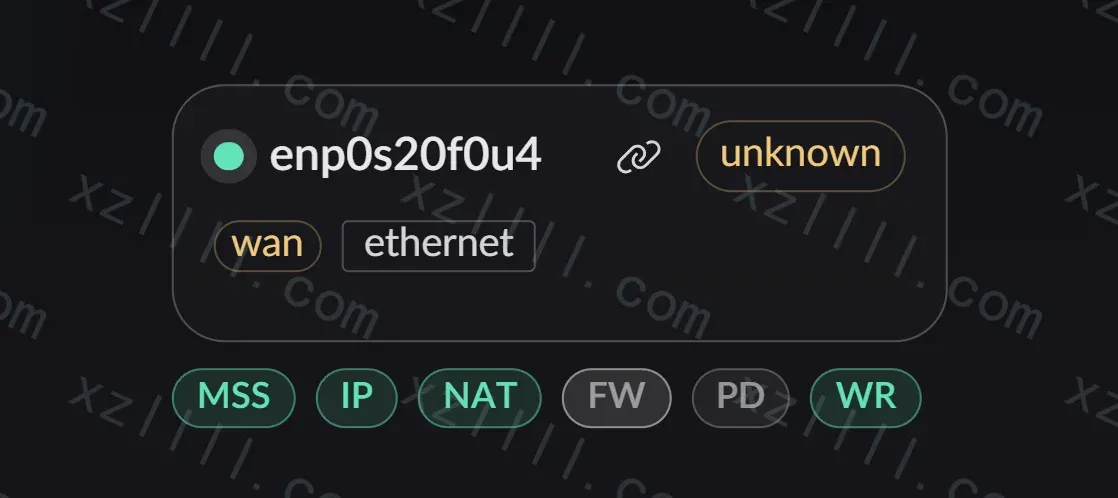
切换网卡运行区域为WAN
-
开启 MSS / NAT / WR 服务
-
写入 systemd-networkd 获取到的IP地址和网关 -
Release v0.19.1后可以让 Landscape 负责 DHCP-Client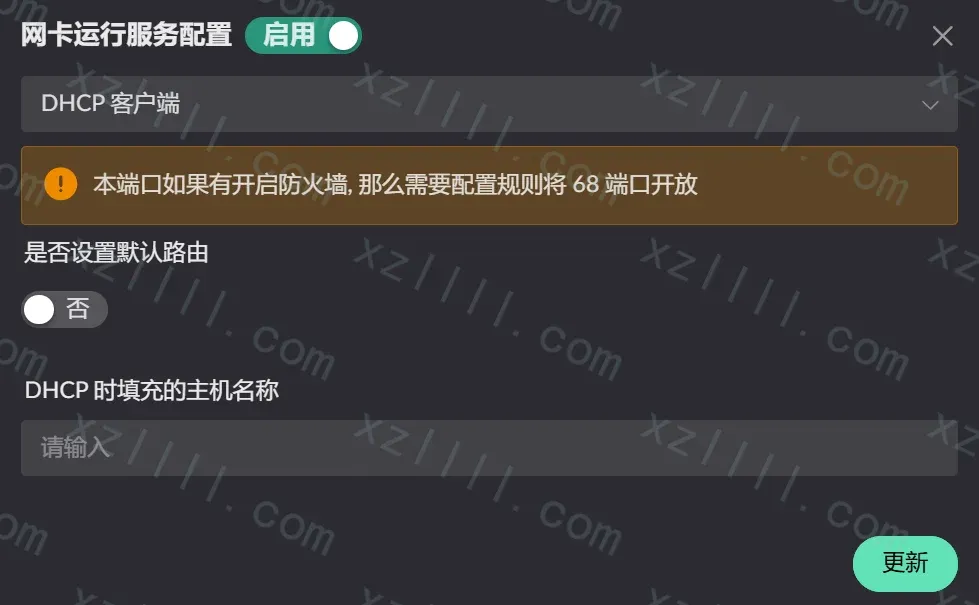
-
导航至分流设置创建一个新Flow
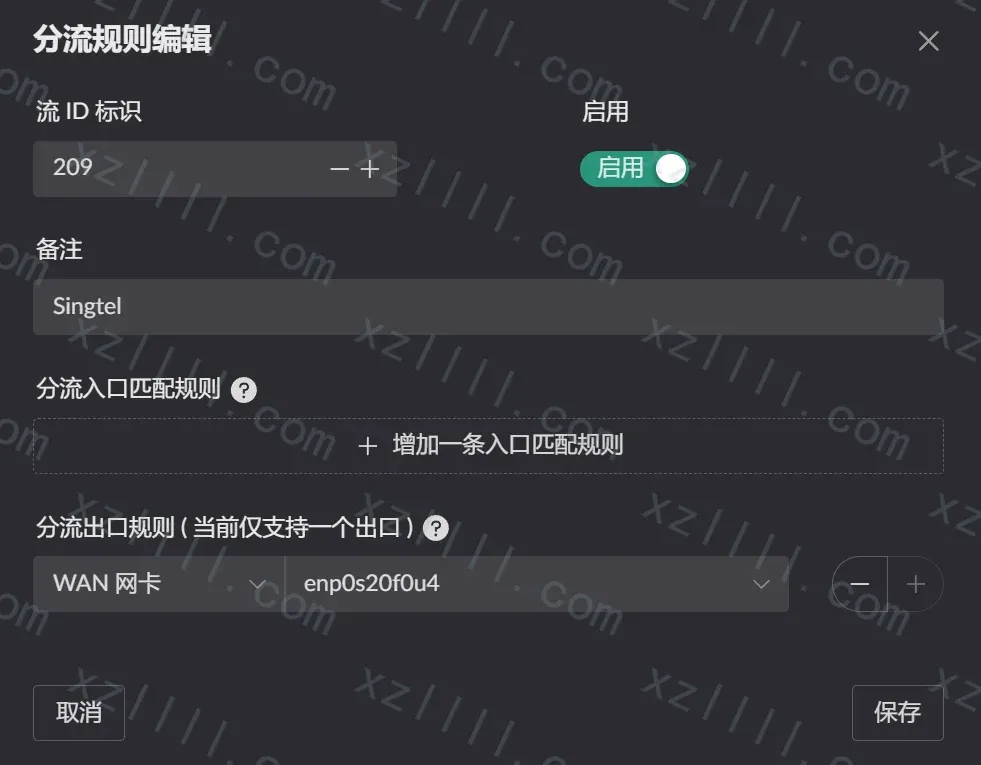
-
根据需要分流至上一步创建的 Flow 即可
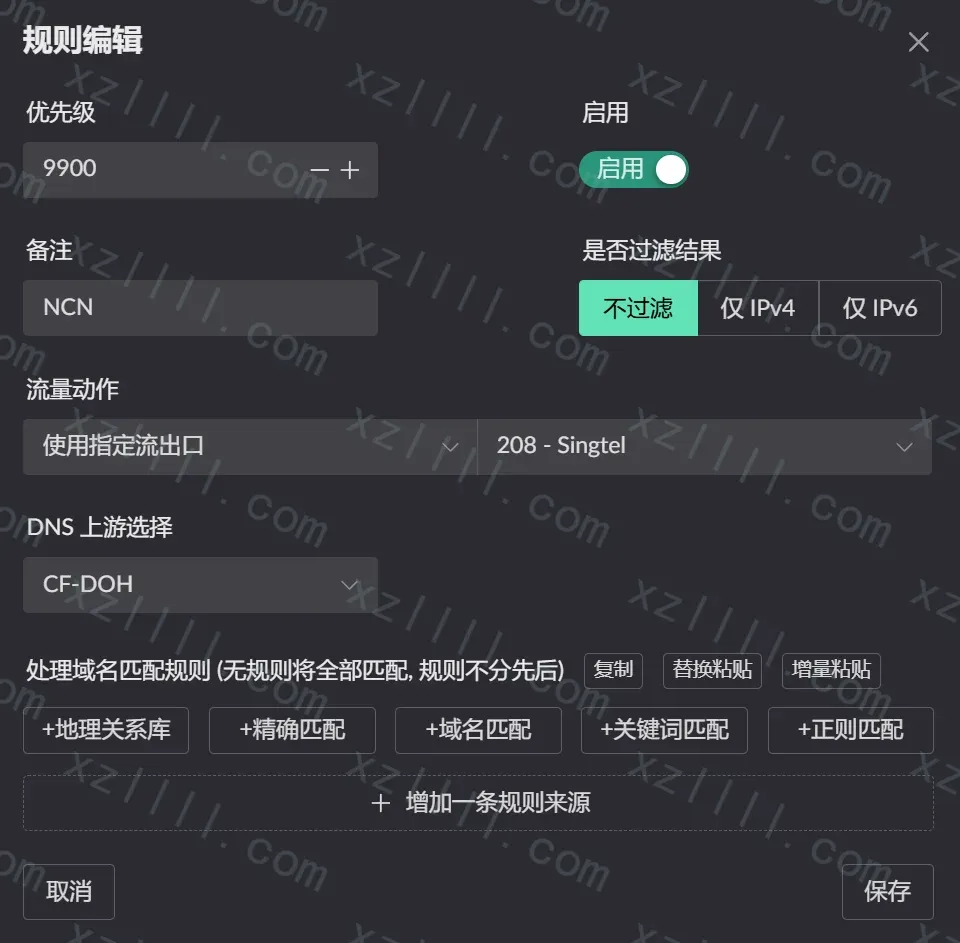
Thanks & Copy
Landscape Router
Configuring Linux as a Router