Linux通过NUT接入SANTAK(山特) TG-BOX600 UPS
02x01.System
02x02.安装Network UPS Tools (NUT)工具
查看一下包详情
SUSE命令使用了zsh工具进行简化,以下内容展现简化后命令
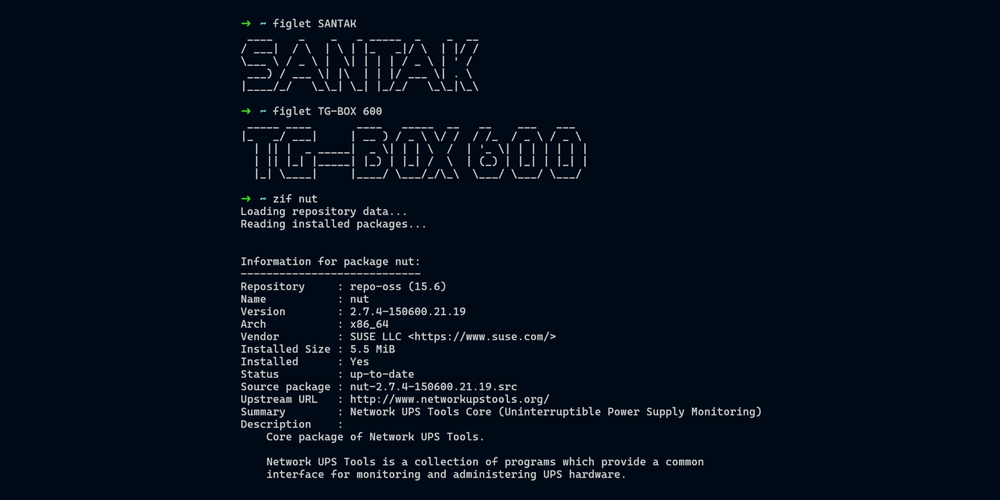
➜  ~ zif nut
Loading repository data...
Reading installed packages...
Information for package nut:
----------------------------
Repository     : Main Repository (OSS)
Name           : nut
Version        : 2.8.0-2.1
Arch           : x86_64
Vendor         : openSUSE
Installed Size : 7.2 MiB
Installed      : No
Status         : not installed
Source package : nut-2.8.0-2.1.src
Upstream URL   : https://www.networkupstools.org/
Summary        : Network UPS Tools Core (Uninterruptible Power Supply Monitoring)
Description    :
    Core package of Network UPS Tools.

    Network UPS Tools is a collection of programs which provide a common
    interface for monitoring and administering UPS hardware.

➜  ~
正是我们需要的,下面开始安装
zin nut
进入nut目录
➜  pwd
/etc/ups
➜  ll
total 64K
-rw-r--r-- 1 root root 1.1K Apr 16 04:55 hosts.conf
-rw-r--r-- 1 root root 1.9K Apr 16 04:55 nut.conf
-rw-r--r-- 1 root root 9.0K Apr 16 04:55 ups.conf
-rw------- 1 upsd root 7.2K Apr 16 04:55 upsd.conf
-rw------- 1 upsd root 2.4K Jun  7 16:39 upsd.users
-rw------- 1 upsd root  20K Jun  7 16:39 upsmon.conf
-rw-r--r-- 1 root root 4.2K Apr 16 04:55 upssched.conf
-rw-r--r-- 1 root root 1.4K Apr 16 04:55 upsset.conf
➜
02x03.配置Network UPS Tools (NUT)
我们需要配置五个文件,分别是
- nut.conf
- upsd.conf
- ups.conf
- upsmon.conf
- upsd.users
每一个config官方都有手册,点此直达
03x01.配置nut.conf
nut.conf我们需要修改MODE一项;因为我们是单一UPS,所以将MODE修改为standalone即可
下方为默认config,三个选项均有明确释义
➜  cat nut.conf
# Network UPS Tools: example nut.conf
#
##############################################################################
# General section
##############################################################################
# The MODE determines which part of the NUT is to be started, and which
# configuration files must be modified.
#
# This file try to standardize the various files being found in the field, like
# /etc/default/nut on Debian based systems, /etc/sysconfig/ups on RedHat based
# systems, ... Distribution's init script should source this file to see which
# component(s) has to be started.
#
# The values of MODE can be:
# - none: NUT is not configured, or use the Integrated Power Management, or use
#   some external system to startup NUT components. So nothing is to be started.
# - standalone: This mode address a local only configuration, with 1 UPS
#   protecting the local system. This implies to start the 3 NUT layers (driver,
#   upsd and upsmon) and the matching configuration files. This mode can also
#   address UPS redundancy.
# - netserver: same as for the standalone configuration, but also need
#   some more network access controls (firewall, tcp-wrappers) and possibly a
#   specific LISTEN directive in upsd.conf.
#   Since this MODE is opened to the network, a special care should be applied
#   to security concerns.
# - netclient: this mode only requires upsmon.
#
# IMPORTANT NOTE:
#  This file is intended to be sourced by standard POSIX shell scripts (so
#  there is no guaranteed `export VAR=VAL` syntax) and by systemd on Linux.
#  You MUST NOT use spaces around the equal sign!

MODE=none

# Uncomment this to allow starting the service even if ups.conf has no device
# sections at the moment. This environment variable overrides the built-in
# "false" and an optional same-named default flag that can be set in upsd.conf:
#ALLOW_NO_DEVICE=true
#export ALLOW_NO_DEVICE
03x02.配置upsd.conf
需要在upsd.conf配置监听端口,保持默认即可,即为
LISTEN 127.0.0.1 3493
LISTEN ::1 3493
03x03.确认USB连接成功并测试
使用lsusb查看UPS的USB是否成功连接
➜  lsusb | grep "UPS"
Bus 001 Device 003: ID 0463:ffff MGE UPS Systems UPS
接着我们使用upsdrvctl start命令检测,回显如下
➜  upsdrvctl start
Network UPS Tools - UPS driver controller 2.8.0
Network UPS Tools - Generic HID driver 0.47 (2.8.0)
USB communication driver (libusb 1.0) 0.43
Using subdriver: MGE HID 1.46
03x04.配置ups.conf
接着我们修改ups.conf文件,将尾部默认配置修改为以下内容
[santak600]
    driver=usbhid-ups
    port=auto
    desc="SANTAK TGBOX-600"
- [santak600] 一项为自定义UPS项,可以更改为自己的想要的名称,默认为myups
- driver=usbhid-ups一项指定监控此UPS的程序,SANTAK TG-BOX 600使用的硬件为MGE USB,所以我们使用usbhid-ups
- port=auto 一项指定连接UPS的串口,因为我们使用的是USB类型的UPS,所以我们使用auto
- desc="SANTAK TGBOX-600" 为一个简短的描述(可选)
03x05.配置upsmon.conf
配置upsmon以监听upsd
user&password在upsd.users配置中自动生成并同步至upsmon.conf,所以我们只需修改upsname一项为santak600即可
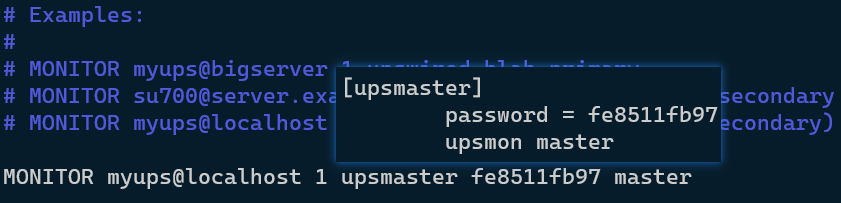
MONITOR santak600@localhost 1 upsmaster fe8511fb97 master
03x06.配置upsd.users
上一步配置upsmon.conf文件中提到,user&password由upsd.users配置中自动生成并同步至upsmon.conf
这一步我们便要配置upsd.users文件以便使用upsrw命令向UPS传递参数
文件看起来如下所示
[upsmaster]
        password = fe8511fb97
        upsmon master
        actions = set
        actions = fsd

[upsslave]
        password = 4256dc82c1
        upsmon slave
这里我们仅关注upsmaster用户,我们为其添加actions = set actions = fsd以便使用upsrw命令向UPS传递参数
02x04.运行nut各项服务
03x01.运行nut-server.service
启动nut-server.service服务
sc-start nut-server.service
使用upsc upsname 查看UPS状态
➜  upsc santak600
battery.charge: 100
battery.charge.low: 20
battery.runtime: 1056
battery.type: PbAc
device.mfr: EATON
device.model: SANTAK TG-BOX 600
device.serial: Blank
device.type: ups
driver.name: usbhid-ups
driver.parameter.pollfreq: 30
driver.parameter.pollinterval: 2
driver.parameter.port: auto
driver.parameter.synchronous: auto
driver.version: 2.8.0
driver.version.data: MGE HID 1.46
driver.version.internal: 0.47
driver.version.usb: libusb-1.0.26 (API: 0x1000109)
input.transfer.high: 264
input.transfer.low: 184
outlet.1.desc: PowerShare Outlet 1
outlet.1.id: 1
outlet.1.status: on
outlet.1.switchable: no
outlet.desc: Main Outlet
outlet.id: 0
outlet.switchable: yes
output.frequency.nominal: 50
output.voltage: 230.0
output.voltage.nominal: 220
ups.beeper.status: enabled
ups.delay.shutdown: 20
ups.delay.start: 30
ups.firmware: 02.08.0010
ups.load: 14
ups.mfr: EATON
ups.model: SANTAK TG-BOX 600
ups.power.nominal: 600
ups.productid: ffff
ups.realpower: 67
ups.serial: Blank
ups.status: OL
ups.timer.shutdown: -1
ups.timer.start: -1
ups.type: offline / line interactive
ups.vendorid: 0463
03x02.运行nut-monitor.service
启动nut-monitor.service
sc-start nut-monitor.service
查看nut-monitor.service运行状态确保正常运行
sc-status nut-monitor.service
回显如下
➜  ~ sc-status nut-monitor.service
● nut-monitor.service - Network UPS Tools - power device monitor and shutdown controller
     Loaded: loaded (/usr/lib/systemd/system/nut-monitor.service; enabled; preset: disabled)
     Active: active (running) since Wed 2023-06-07 18:05:14 CST; 31min ago
   Main PID: 24799 (upsmon)
      Tasks: 2 (limit: 4915)
        CPU: 112ms
     CGroup: /system.slice/nut-monitor.service
             ├─24799 /usr/sbin/upsmon -F
             └─24802 /usr/sbin/upsmon -F

Jun 07 18:05:14 TGateway systemd[1]: Started Network UPS Tools - power device monitor and shutdown controller.
Jun 07 18:05:14 TGateway nut-monitor[24799]: fopen /run/upsmon.pid: No such file or directory
Jun 07 18:05:14 TGateway nut-monitor[24799]: Could not find PID file to see if previous upsmon instance is already running!
Jun 07 18:05:14 TGateway nut-monitor[24799]: UPS: santak600@localhost (primary) (power value 1)
Jun 07 18:05:14 TGateway nut-monitor[24799]: Using power down flag file /etc/killpower
➜  ~
03x03.运行nut-driver@*.service
NUT升级至2.8后,nut-driver@*.service会由nut-driver-enumerator.service生成且自动配置;所以这里我们启动nut-driver-enumerator来实现自动配置
若NUT版本低于2.8,则正常启动nut-driver.service即可
sc-start nut-driver-enumerator.service
查看其运行情况
➜  sc-status [email protected]
● [email protected] - Network UPS Tools - device driver for NUT device 'santak600'
     Loaded: loaded (/usr/lib/systemd/system/[email protected]; enabled; preset: disabled)
    Drop-In: /etc/systemd/system/[email protected]
             └─nut-driver-enumerator-generated-checksum.conf, nut-driver-enumerator-generated.conf
     Active: active (running) since Wed 2023-06-07 17:53:24 CST; 1h 40min ago
   Main PID: 22500 (usbhid-ups)
      Tasks: 1 (limit: 4915)
        CPU: 748ms
     CGroup: /system.slice/system-nut\x2ddriver.slice/[email protected]
             └─22500 /usr/libexec/ups/driver/usbhid-ups -a santak600

Jun 07 17:53:14 TGateway systemd[1]: Starting Network UPS Tools - device driver for NUT device 'santak600'...
Jun 07 17:53:14 TGateway nut-driver@santak600[22466]: grep: warning: stray \ before #
Jun 07 17:53:14 TGateway nut-driver@santak600[22476]: Duplicate driver instance detected (PID file /var/lib/ups/usbhid-ups-santak600.pid exists)! Terminating other driver!
Jun 07 17:53:22 TGateway nut-driver@santak600[22476]: Using subdriver: MGE HID 1.46
Jun 07 17:53:22 TGateway nut-driver@santak600[22476]: Network UPS Tools - Generic HID driver 0.47 (2.8.0)
Jun 07 17:53:22 TGateway nut-driver@santak600[22476]: USB communication driver (libusb 1.0) 0.43
Jun 07 17:53:24 TGateway usbhid-ups[22500]: Startup successful
Jun 07 17:53:24 TGateway nut-driver@santak600[22431]: Network UPS Tools - UPS driver controller 2.8.0
Jun 07 17:53:24 TGateway systemd[1]: Started Network UPS Tools - device driver for NUT device 'santak600'.
Jun 07 18:01:28 TGateway usbhid-ups[22500]: sock_connect: enabling asynchronous mode (auto)
➜
02x05.设置服务自启
03x01.启用nut.target&nut-driver.target
必须启用nut.target&nut-driver.target以便上述systemd服务在引导时启动
sc-enable nut.target nut-driver.target
03x02.Reboot后测试服务状态
分别查看:服务器启动时间,当前时间,服务运行状态已确保上述systemd服务正确配置引导启动
➜  ~ who -b
         system boot  Jun  8 09:17
➜  ~ uptime
 09:24:51  up   0:07,  1 user,  load average: 0.24, 0.46, 0.32
➜  ~ sc-is-active nut-server.service nut-monitor.service [email protected]
active
active
active
➜  ~
02x06.修改battery.charge.low值
battery.charge.low 即低电量标识
当达到设定阈值时UPS会向NUT程序发送低电量警告,让NUT做出下一步动作
若我们需要留存给设备更多的关机时间,我们必须将此值设定的大一些(我这边默认为60)
-
查看battery.charge.low默认值
upsc santak600 | grep "battery.charge.low"回显如下
battery.charge.low: 60 -
修改battery.charge.low
这里演示我们修改此项值为90,即UPS电量消耗至90%时向NUT程序发送低电量警告
upsrw -s battery.charge.low=60 -u upsmaster -p fe8511fb97 santak600@localhost上述命令行请根据自身设置替换-u和-p的值还有您的设置的UPS型号
若一切没有问题,shell会回显OK值表示设置成功,看起来是这样

nut.service也会输出日志来表示设置成功