如何获取 Dropbox Refresh Token ?
1. First | 序
自 DropBox 使用 OAuth 2.0 进行授权后就停止生成长寿命的 access tokens
we prepare to retire long-lived tokens on September 30th, 2021.
取而代之的主要是以下四项的引入
- short-lived tokens
- scopes
- PKCE
- refresh tokens
这也就意味着我们获取到的access tokens默认为 short-lived tokens (有效期4小时)
本篇将记录如何获取 refresh tokens 来无限制的刷新访问令牌,解决 access tokens 过期问题
1.1. OS&APP Version | * 版本
rclone v1.66.0
- os/version: Microsoft Windows 10 IoT Enterprise LTSC 2021 21H2 (64 bit)
- os/kernel: 10.0.19044.5487 (x86_64)
- os/type: windows
- os/arch: amd64
- go/version: go1.22.1
- go/linking: static
- go/tags: cmount
2. 知识库
2.1. short-lived tokens & refresh tokens
此篇我们主要了解 short-lived tokens & refresh tokens
-
short-lived tokens
短期访问令牌: 默认将获取此项,有效期为14400秒(4小时)
-
refresh tokens
刷新令牌: 当访问令牌过期时,它允许客户端应用程序(比如Rclone)使用刷新令牌获取新的访问令牌,而无需要求用户再次登录
2.2. token_access_type
如果此参数设置为 Offline,则成功调用 /oauth2/token 后返回的访问令牌有效负载将包含一个短期访问令牌 (access_token) 和一个长期访问令牌 (refresh_token)。只要用户的授权仍然有效,即可使用 refresh_token 请求新的短期访问令牌。如果设置为 Online,则仅返回一个短期访问令牌 (access_token)。如果省略此参数,则默认为 Online。
2.3. Redirect URIs
✅ 什么是 Redirect URI?
在 OAuth 2.0 流程中:
- 用户在浏览器中被引导到 Dropbox 的授权页面。
- 授权成功后,Dropbox 需要把 授权码(code) 返回给你的程序。
- 它是通过“重定向”浏览器到某个地址,并附上授权码实现的——这个地址就是 Redirect URI。
举个例子:
你访问:
https://www.dropbox.com/oauth2/authorize?client_id=abc123&redirect_uri=http://localhost:53682&response_type=code

用户同意授权后,Dropbox 跳转到:
http://localhost:53682/?code=XYZ123
然后你的程序(如 Rclone)监听这个地址,抓住这个 code,用它换取 access_token。
🧪 为什么 Rclone 推荐使用 http://localhost:53682/?
当你用 rclone config 交互式配置 Dropbox 的时候:
- 它会自动开启一个本地的临时 HTTP 服务器(监听
localhost:53682) - 当你授权完,Dropbox 会把授权码传回这个地址
- Rclone 捕获后立刻完成后续 token 获取流程
这就能实现全自动化,不需要你手动复制粘贴 code。
所以 Rclone 要求你 在 Dropbox App 的配置中 添加:
http://localhost:53682/
不然 Dropbox 会拒绝重定向请求(因为它需要验证 Redirect URI 是你授权过的)。
📌 如果你不添加这个 Redirect URI,会发生什么?
Dropbox 授权后会报错类似:
redirect_uri_mismatch- The redirect_uri passed in the request does not match the redirect URI registered for the app.
这时 Rclone 就接收不到 code,整个流程就断了。
✅ 我可以用其他 Redirect URI 吗?
可以,只要它跟你实际用的一致就行。如果你是写网页 app,可能就会用:
https://yourdomain.com/oauth/callback
但对于本地工具(如 Rclone、rclone-browser、桌面客户端),最常见的是:
http://localhost:PORT/
💡 小总结
| 项目 | 解释 |
|---|---|
| Redirect URI | OAuth 授权后 Dropbox 回调的地址 |
| 为什么是 localhost:53682 | Rclone 临时本地 HTTP 服务监听的端口 |
| 如果不匹配会怎样 | 授权失败,code 无法接收 |
| 如何设置 | 在 Dropbox App 控制台添加 http://localhost:53682/ 到 Redirect URIs |
3. Procedure | 步骤
获取 refresh tokens 主要为以下几步依次进行:
- Create Apps
- 获取 App key & App secret
- 获取 access code
- 获取 access token 和 refresh token
3.1. Create Apps
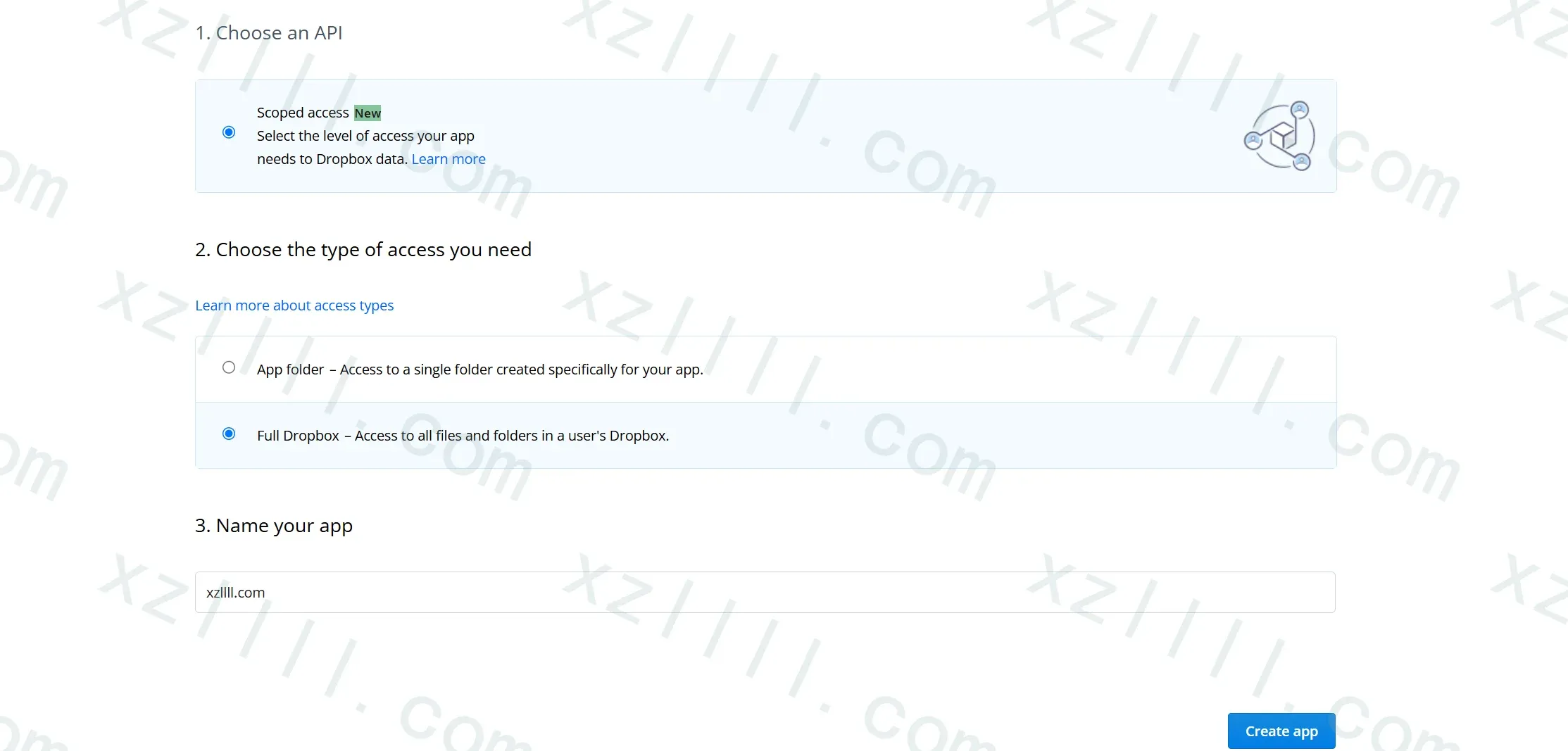
首先我们需要创建一个App
-
Choose The type of access you need
根据自己需要选择:
- App folder
在用户 Dropbox 的“应用”文件夹中,会创建一个以您的应用命名的专用文件夹。您的应用仅拥有此文件夹的读写权限,用户可以通过将文件移动到此文件夹来向您的应用提供内容。 - Full Dropbox
完全访问用户 Dropbox 中的所有文件和文件夹
- App folder
-
Name your app
注意此项名称具有全局唯一性(假如A用户已经叫张三,你就只能写李四)
3.2. 获取 App key & App secret
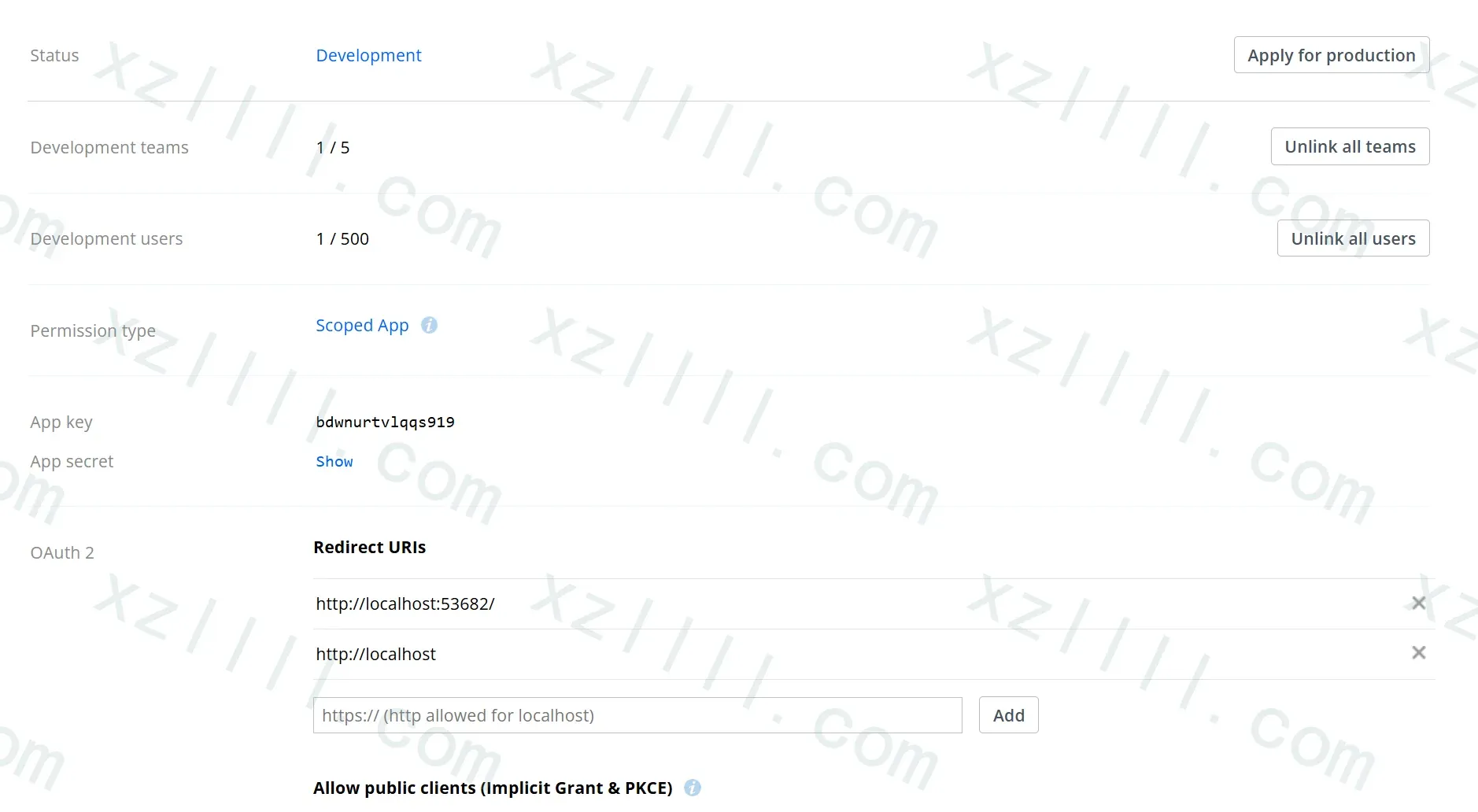
创建APP完毕后我们可以在Setting选项卡获取到显式的App key和默认隐藏的App secret
别忘了点击
Enable Additional Users启用其他用户
3.3. 获取 access code
当我们拿到 App key 后我们就可以让用户授予APP访问权限以获取访问码
token_access_type=offline
授权URL 如下所示
https://www.dropbox.com/oauth2/authorize?client_id=<APP_KEY>&token_access_type=offline&response_type=code
请将<APP_KEY>替换为上节获取到的<APP_KEY>
Ex | 示例如下
https://www.dropbox.com/oauth2/authorize?client_id=
bxjufgmchsxfjs7&token_access_type=offline&response_type=code
Ex | 授权过程示例
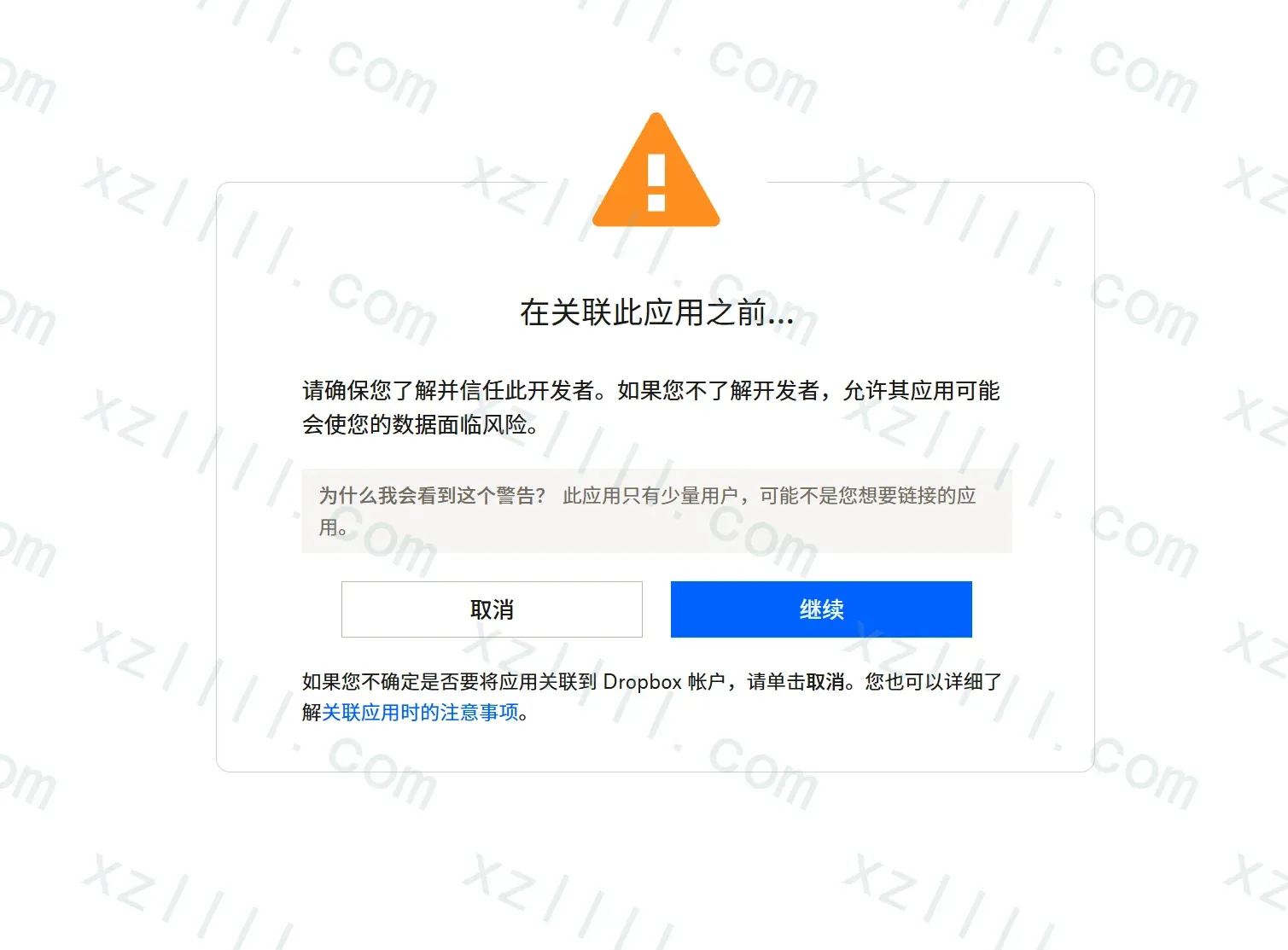
-
选择继续
-
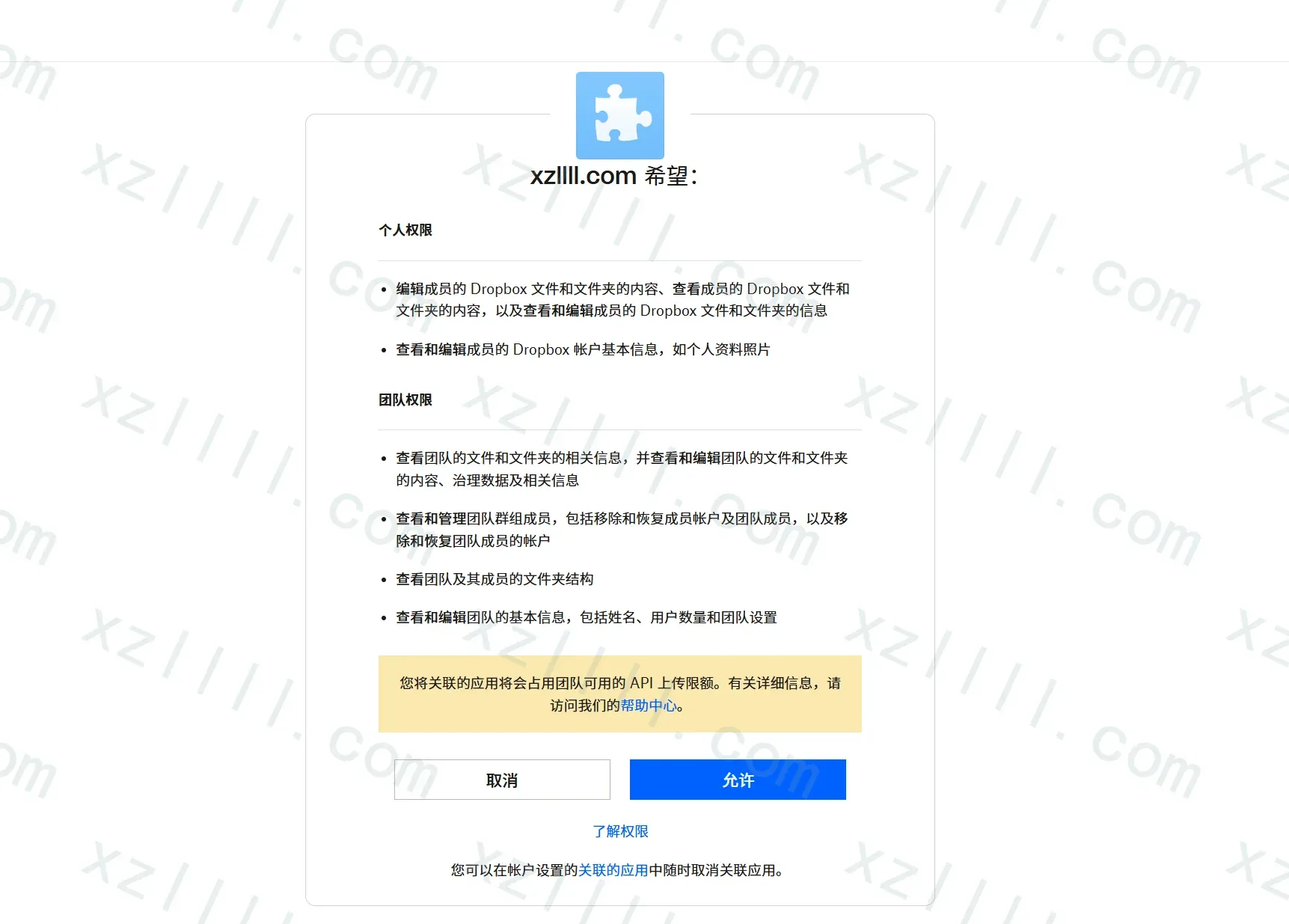
审核App权限
没问题则点击允许
-
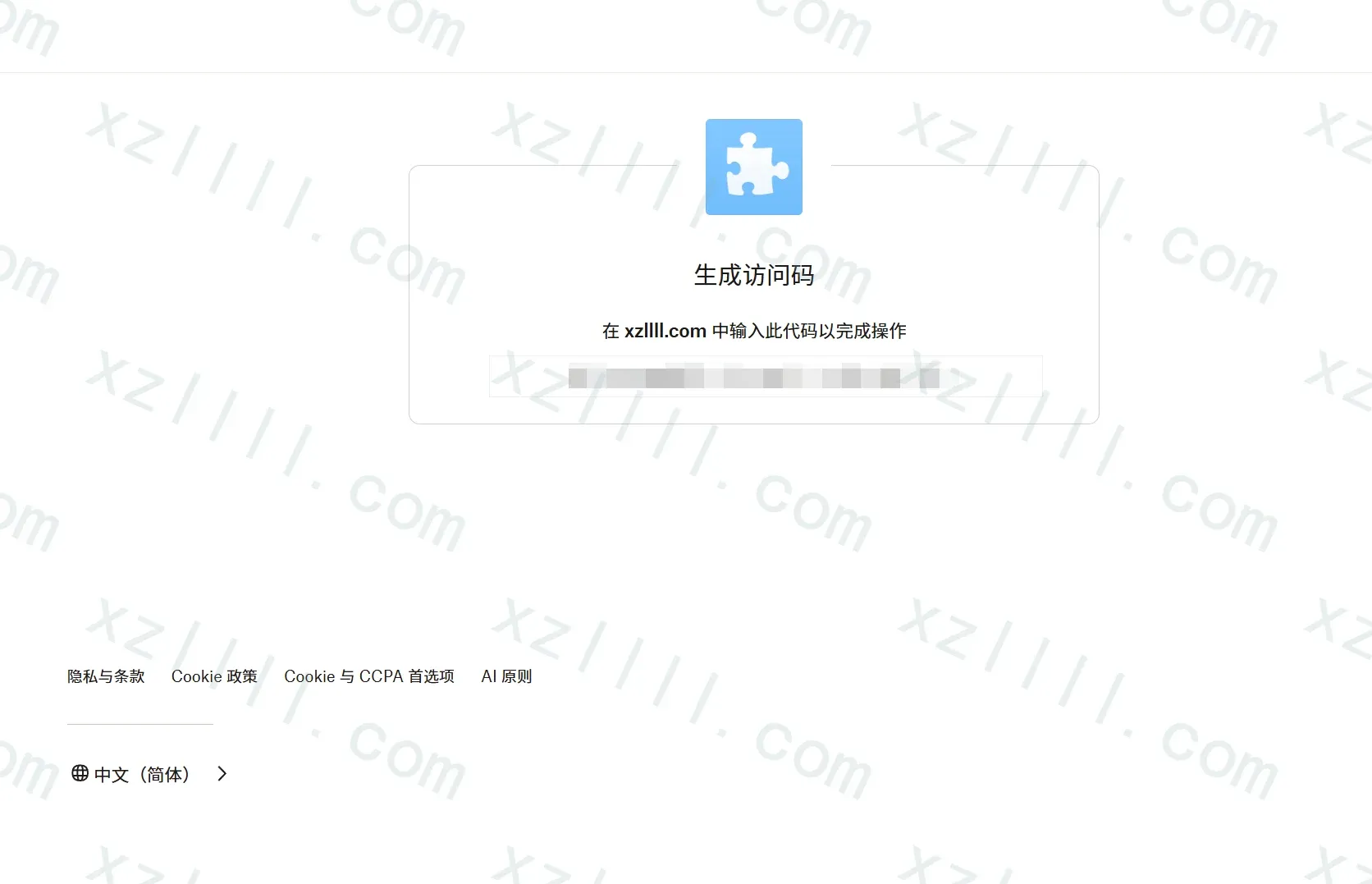
记录生成的访问码
3.4. 获取 access token 和 refresh token
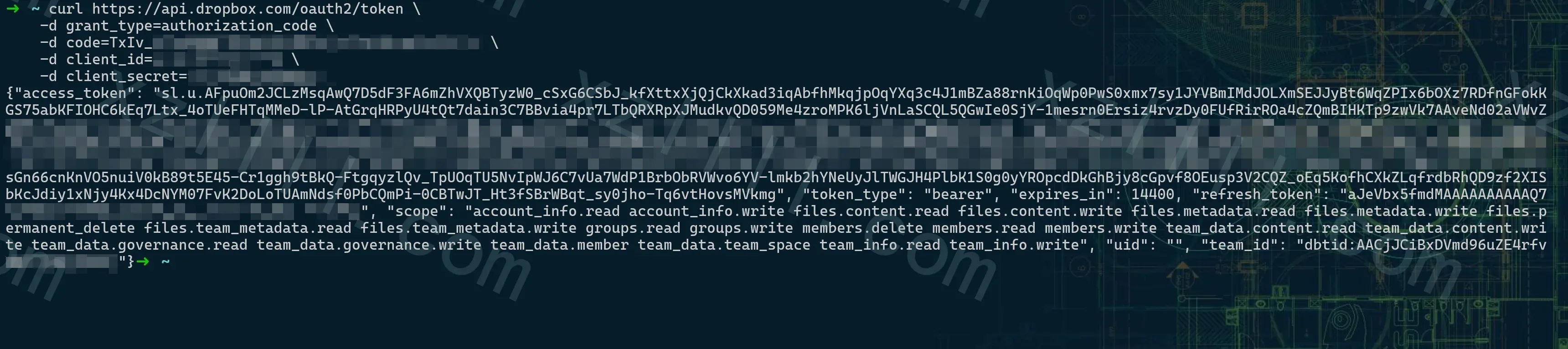
获取访问码后我们使用curl(http)来获取access token 和 refresh token
格式如下(请替换<>项) redirect_uri= 项可以省略
```bash
curl https://api.dropbox.com/oauth2/token \
-d code=<AUTHORIZATION CODE> \
-d grant_type=authorization_code \
-d client_id=<APP KEY> \
-d client_secret=<APP SECRET> \
-d redirect_uri=<REDIRECT URI>
```
回显格式如下:
```
{"access_token": "<ACCESS TOKEN>", "expires_in": "<EXPIRATION>", "token_type": "bearer", "scope": "<SCOPES>", "refresh_token": "<REFRESH TOKEN>", "account_id": "<ACCOUNT ID>", "uid": "<USER ID>"}
```
Ex | 示例
curl https://api.dropbox.com/oauth2/token \
    -d grant_type=authorization_code \
    -d code=TxIv_xxxxxxxxxxxxxxxxxxx \
    -d client_id=xxxxxxxxx \
    -d client_secret=xxxxxxxxxxxxxx
3.5. 获取 new short-lived access token
一旦我们拿到了refresh token
我们就可以使用refresh token来不断的获取new short-lived access token
格式如下(请替换<>项)
```bash
curl https://api.dropbox.com/oauth2/token \
   -d refresh_token=<REFRESH TOKEN> \
   -d grant_type=refresh_token \
   -d client_id=<APP KEY> \
   -d client_secret=<APP SECRET>
```
回显格式如下
```bash
{"access_token": "<NEW ACCESS TOKEN>", "expires_in": "<EXPIRATION>", "token_type": "bearer"}
```
Ex | 示例

Thanks & Copy
Dropbox Doc


 Dropbox Platform Team

 API Platform Team
 Dropbox Platform Team